
Configuration Nextcloud
Configuration de la Machine Virtuelle
Ubuntu 24.04
4vCPU
4Go de RAM
500 Go de disque
Activer les dépôt PHP récents sous Ubuntu
apt install ca-certificates apt-transport-https software-properties-common
add-apt-repository ppa:ondrej/php
Activer les dépôt PHP récents sous Debian
apt install ca-certificates apt-transport-https lsb-release
wget -q https://packages.sury.org/php/apt.gpg -O- | sudo apt-key add -
echo "deb https://packages.sury.org/php/ $(lsb_release -sc) main" | sudo tee /etc/apt/sources.list.d/php.list
Supprimer Snapd
apt remove --purge snapdInstallation des prérequis
apt install apache2 mariadb-server php8.3-fpm redis-server
apt install php8.3-fpm php8.3-common php8.3-mbstring php8.3-xmlrpc php8.3-soap php8.3-gd php8.3-mysql php8.3-xml php8.3-intl php8.3-mysql php8.3-cli php8.3-ldap php8.3-zip php8.3-curl php8.3-bz2 php8.3-imap php8.3-tidy php8.3-bcmath php8.3-gmp php8.3-redis
apt install libmagickcore-6.q16-6-extra
Configuration MariaDB
Sécurisation de la base de donnée
mysql_secure_installationConnexion à la base de donnée en tant que root
mysql -u rootConfiguration de la base de donnée nextcloud
CREATE USER 'nextcloud'@'localhost' IDENTIFIED BY 'nextcloud';
CREATE DATABASE IF NOT EXISTS nextcloud CHARACTER SET utf8mb4 COLLATE utf8mb4_general_ci;
GRANT ALL PRIVILEGES ON nextcloud.* TO 'nextcloud'@'localhost';
FLUSH PRIVILEGES;
EXIT;
Activation modules PHP-FPM et config PHP pour Apache2
# Activation des modules PHP-CGI
a2enmod proxy_fcgi
a2enconf php8.3-fpm.conf

# Activation des modules HTTPS
a2enmod ssl
a2enmod rewrite
a2enmod headers
a2enmod socache_shmcb

# Relancer le service apache
systemctl restart apache2
Configuration de php-fpm
Modifier le fichier /etc/php/8.3/fpm/php.ini et /etc/php/8.3/cli/php.ini
Modifiez le fuseau horaire (timezone) en Europe/Paris
Modifiez le temps d'exécution d'un script PHP
Modifiez la quantité de mémoire autorisé pour un script PHP (memory_limit)
Modifier la taille autorisé en envoi de fichier (Upload_max_filesize et post_max_size)
date.timezone = Europe/Paris
max_execution_time = 120
memory_limit = 512M
upload_max_filesize = 20M
post_max_size = 20M
opcache.save_comments = 1
opcache.revalidate_freq = 60
opcache.jit = 1255
opcache.jit_buffer_size = 128M
Enfin Rechargez php8.3-fpm
systemctl restart php8.3-fpm.serviceConfiguration Apache
Créer le fichier de configuration dans /etc/apache2/sites-available/nextcloud.conf
<VirtualHost *:80>
# Racine Web
DocumentRoot /var/www/nextcloud

# Bloc configuration Application
   <Directory /var/www/nextcloud>
        Options ExecCGI FollowSymlinks MultiViews
        AllowOverride All
        Require all granted
        <IfModule mod_dav.c>
        Dav off
        </IfModule>
   </Directory>

# Emplacements des logs
  ErrorLog ${APACHE_LOG_DIR}/error.log
  CustomLog ${APACHE_LOG_DIR}/access.log combined
</VirtualHost>
Configuration Caddy
Créer le fichier de configuration dans /etc/caddy/Caddyfile
#https://caddy.community/t/caddy-v2-configuration-nextcloud-docker-php-fpm-with-rules-from-htaccess/20662
{
	servers	{
		protocols h1 h2c
	}
}

# port a servir
:80

# Bloc log
# Garde les logs pendant 1 an conformément à la loi française
log {
        output file /var/log/caddy/access.json {
                roll_size 1gib
                roll_keep 5
                roll_keep_for 8760h
        }
}

# Règles équivalent du .htaccess fourni par nextcloud
redir /.well-known/carddav /remote.php/dav 301
redir /.well-known/caldav /remote.php/dav 301
redir /.well-known/* /index.php{uri} 301 # Nextcloud front-controller handles routes to /.well-known
redir /remote/* /remote.php{uri} 301

# Restreint l'accès aux fichiers sensibles de Nextcloud
@forbidden {
	path /build/* /tests/* /config/* /lib/* /3rdparty/* /templates/* /data/*
	path /.* /autotest* /occ* /issue* /indie* /db_* /console*
	not path /.well-known/*
	}
	error @forbidden 404

# Definit un cache pour les fichiers statique versionnées
@immutable {
	path *.css *.js *.mjs *.svg *.gif *.png *.jpg *.ico *.wasm *.tflite
	query v=*
	}
header @immutable Cache-Control "max-age=15778463, immutable"

# Definit un cache pour les fichiers statique
@static {
	path *.css *.js *.mjs *.svg *.gif *.png *.jpg *.ico *.wasm *.tflite
	not query v=*
	}
header @static Cache-Control "max-age=15778463"

# Définit un cache pour une semaine des polices
	@woff2 path *.woff2
	header @woff2 Cache-Control "max-age=604800"
# Definition du chemin racine Web
root * /var/www/nextcloud
# Compression
encode zstd gzip
# Backend PHP 8.3
php_fastcgi unix//run/php/php8.3-fpm.sock
# Fichier web à servir
file_server
Activez la configuration nextcloud
a2ensite nextcloud.confInstallation des fichiers Nextcloud
Téléchargement du zip:
wget https://download.nextcloud.com/server/releases/latest.zipDécompression de l'archive vers /var/www
unzip latest.zip -o /var/www/Attribution des droits au serveur web
# Pour Apache2
chown -R www-data:www-data /var/www/nextcloud
# Pour Caddy
chown -R caddy:caddy /var/www/nextcloud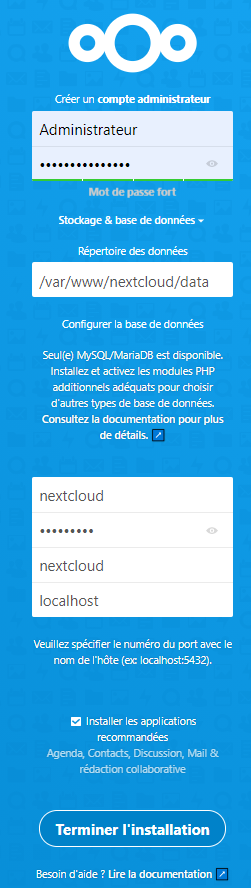
Configuration Nextcloud
Fichier de configuration
Il est ou le fichier de config ?
/var/www/nextcloud/config/config.php
<?php
$CONFIG = array (
  'instanceid' => 'id_instance',
  'passwordsalt' => 'Mot_De_Passe_Salé',
  'secret' => 'Secret',
  'trusted_domains' =>
  array (
    0 => 'cloud.lgarre.fr',
  ),
  'datadirectory' => '/var/www/nextcloud/data',
  'dbtype' => 'mysql',
  'version' => '25.0.0.0',
  'overwrite.cli.url' => 'https://cloud.lgarre.fr',
  // Début Config modifié
  'trusted_proxies'   => ['192.168.68.50'],
  'overwriteprotocol' => 'https',
  'htaccess.RewriteBase' => '/',
  'default_phone_region' => 'FR',
  'filelocking.enabled' => true,
  'memcache.local' => '\OC\Memcache\Redis',
  'memcache.distributed' => '\OC\Memcache\Redis',
  'memcache.locking' => '\OC\Memcache\Redis',
  'redis' => [
     'host'     => '127.0.0.1',
     'port'     => 6379,
     'dbindex'       => 0,
     'timeout'       => 1.5,
     'read_timeout'  => 1.5,
],
  // fin de modification de la config
  'dbname' => 'nextcloud',
  'dbhost' => 'localhost',
  'dbport' => '',
  'dbtableprefix' => 'oc_',
  'mysql.utf8mb4' => true,
  'dbuser' => 'nextcloud',
  'dbpassword' => 'Mot_De_Passe_DB',
  'installed' => true,
);
Réécriture des liens
Seul l'élu peut faire des modifications !
Les commandes OCC doivent IMPERATIVEMENT être exécutée en tant que www-data pour s'assurer que les droits soient correct
Cette commande va forcer à réécrire les liens URL pour supprimer index.php
sudo -u www-data php occ maintenance:update:htaccessTaches planifié
Ajouter une tâche planifiée au compte du serveur web (www-data)
crontab -u www-data -eL'éditeur de votre choix s'ouvre, ajouter la ligne suivante
*/5 * * * * php -f /var/www/nextcloud/cron.phpDans les paramètre de NextCloud sélectionnez Cron en tant que gestionnaire des tâches de fond
